Today world is facing several critical problems that even the modern technology has also failed to answer perfectly. Growing population of the earth, water and air pollution, running out of fossil fuel etc. But among those most recently discussed aspects were CO2 emission and effects cause to living beans of the earth because of it. We all know co2 emission to the atmosphere increased so rapidly after the industrialization in early 70s. Since then everybody talks about it. but no one cares to take strict actions without hesitations at all.
When it comes to a country like us, of course we have several fall backs and humps towards to the ward sustainable. If I ask what is the key advantage that we have as Sri Lankan's is our position in Asian ocean. We have learnt of it heard of it since our child hoods. But literally doubts are there whether our leaders know that well when we peer in to the actions they should have decided years a go. Thing I want to focus is that we have ocean all around us. We are a tropical country. We have rain forests covering up considerable sand of our land. Wind & Sun rise is of course there. Our holy land is strength enough to grow bio crops too.
I am addressing these issues because in the sense of sustainability, We should give priority to efficient consumption of energy sources and adapt according to melting of those. That means now world is moving towards various kind of re new able energy sources rather than just staying with fossil fuels. One thing is for sure that if demand for the fossil fuel remains as now, there will be a potential risk of world to be in dark. More than 80% of our energy consumption is depending on fuel and one of the coal power station is developing to add up with it. We cant afford for nuclear power plants too. Scientists have found out and even manufactured vehicles those work on re new able energy sources like solar power, wind and even in bio crops like sugar cane. Some local people also have done researches and found out nature friendly vehicles and electronic devices. These innovative and talented creations should have been applied to development process of the country through good hands practically.
Saturday, August 14, 2010


Saturday, May 8, 2010
Tips & Tricks to J2ME 3D Gaming...
Here I am going to share some experience that I had to face during my short j2me 3d gaming life. Actually I still do many mistakes while coding and consumes several hours sometimes for to catch them. So It is better for me and those who are new to this field to write down some important points which we all forget to focus or neglect to address.
**important:: you better have some considerable knowledge to understand these points because I am not going to explain them in detail.
1. After loading any image or drawing any object or font do not forget to call flushGraphic(). Otherwise No errors will come but relevant images or objects will not draw on the screen.
2. When using Gaming Canvas there are some restrictions regarding key events of the phone according to the way you call gameCanvas’s super class constructor. That means if you call in your constructor as “super (true) “it tells suppress some key events which calls from your class to it’s super class. If you want to assign events for every key then you have to call as “super (false)”. By default gameCanvas support for gaming keys only.
3. When dealing with sprites, specify their proportions correctly. That means if you are going to specify width and height for the sprite, it should be divided in to equivalent segments.
Ex: Suppose you want 10 by 10 sprites to move and total size of your image is 100 by 10. Then when specifying the width you should give 10 exactly to have 10 equal segments. Otherwise image will not load.
4. Use whatever updating code parts earlier than drawing code parts. Suppose in your game loop you first call draw method which takes care of drawing your stuff on the screen and then you call update method. Update method simply update positions of your objects, handle AI etc. If you call update after the draw function then those updates will apply in the next game loop. Actually it does not add much different to the game. But in some cases like low processing power phones it can be felt if your update method is complicated. So it is just better to use this as a best practice.
5. m3g world that you are going to load in to the phone memory can be a large one. It may contain lot of polygons. So when loading it to the screen and rendering it while in the game play, frames might not be smooth enough or game tends to be slow. So use separate m3g worlds and load them only when need. Try to reduce unwanted polygons in mesh objects as much as you can.
6. If you did load worlds as above you should definitely keep remember to null the unnecessary world objects later. Because you load those worlds and extract their objects and add them to a final one world. After that earlier world objects become use less. Otherwise it adds unwanted weight to the game and in some phones it causes to throw out of memory errors.
7. You load m3g world perfectly according to your code. But when you run it it only displays an empty screen with no errors. This is because some textures of your world might be lost or naming mistakes of images.
8. Reduce far clipping frame of your setPerspective method if you want to add some realistic view to the game such as loading distance objects when you are moving towards them. It also adds a little bit of speed to the game.
9. Use image of alphabet font in which fonts have been packed optimally. Use these fonts for menus, alerts and everything rather than using drawFont method because if you use drawFont, that font size and type may vary according to the phone and may not support as well. But if it is an image of course you can call each font separately and create your own messages.
10. Finally do not apply java’s object oriented concept much more. Because if you have written so many classes for each object then your game loop has to switch back and forth for retrieving objects and calling functions. This leads to consume some performance of the game in limited devices.
Saturday, May 1, 2010
Online Adaptive Game Design
For my 3rd year survey report, i have selected the topic "Adaptive Game Design". So I am doing some researches on it. I would like to share what I got familiar with this field so far as an Introduction (Below is an abstraction of my interim report)
When compare a commercial game with a specific commercial software product both in similar capacity, still publishers or rather companies tend to fear for directly involving for just games. That is why yet only a few leading well-known gaming companies are in the market. It is true that most of the games have indeed a real competitive game play. What developers try to do is make a player centered game which can satisfy its players at best while granting a competitiveness plus joy. AI for games has reached to its top today. Game world has been able to behave like in the real world with help of the advance physic and mathematical functions. Throughout the processes like modeling agents, coding, alpha, beta and game play testing, and making development kits for bugs and modifications, developers often concern for a particular limited group of potential users.
Throughout the history there are so many research papers have been written and have been practically applied for small scale games. Adaptation is a major topic not only in games but biological experiments, outer space explorations, nano evolutionary theory and many other engineering aspects. But what it differs from each field is that what technology optimally suits and in what extent it is going to be applied.
In this paper it is going to be demonstrated that still highly aggressive and competitive game play can be achieved with exceptive efficiency, effectively and robustness with help of dynamically adaptive gaming concepts and technologies. This adaptively can be either learning without human interaction (offline) or learning with human interaction during game play (online) [1]. This paper concerns most about online adaptive game development and its feasibility with current gaming life cycle. Adaptation can be defined as “ability to make appropriate responses to changed or changing circumstances” [2] plus learn from its past mistakes and acting like smart.
When it comes to the player’s role, there can be players those who are really smart thinking and play the game with their own logics. But some takes much time for completing a level and some are aggressive. Each of them has different views to the game and of course implementing a game which is capable of satisfying majority of these groups can be really hard to achieve. But throughout the playing life cycle of the game, modeling each player to a default weight and while in the game play, adjusting this weight to fit with player’s performance regarding the knowledge gathers from online statistics and player head up displays (HUDs) updates, adaptive decision making system can established inside the game.
Saturday, November 21, 2009
Installing Apache Ant
Introduction
Apache Ant is a software tool for automating software build processes. It is similar to make but is implemented using the java language, requires the Java platform, and is best suited to building Java projects.
The most immediately noticeable difference between Ant and Make is that Ant uses XML to describe the build process and its dependencies, whereas Make has its Makefile format. By default the XML file is named
Ant is an Apache project. It is open source software, and is released under the Apache Software License.
Download
Apache Ant 1.7.1 is now available for download (This is in zip format and the binary distribution).
Installing Ant
~make sure to go deeper in to the bin of ant as in java
If you can see a out put
Apache Ant is a software tool for automating software build processes. It is similar to make but is implemented using the java language, requires the Java platform, and is best suited to building Java projects.
The most immediately noticeable difference between Ant and Make is that Ant uses XML to describe the build process and its dependencies, whereas Make has its Makefile format. By default the XML file is named
build.xml. For a example if your project consists of many java classes and you want to build them (make .class files) in to seperate destinations you can easily do that by configuring build.xml file.Ant is an Apache project. It is open source software, and is released under the Apache Software License.
Download
Apache Ant 1.7.1 is now available for download (This is in zip format and the binary distribution).
Installing Ant
- Before installing Ant make sure you have JDK1.3 or above installed on your machine and you can call javac or java -version from your command prompt.
- Unzip the downloaded Ant to a directory as you want. Though there are several folders in Ant Home you only need the
binandlibdirectories to run Ant. - Now you have to set your environment variables of your machine. Those who have done this for java knows how to do it.
- First right click on your mycomputer icon. go to advance system settings and click on the environment variable button in the advance tab of that window. Then Environment variable box will apear and under user variables select path and click edit.
- If you have already set path for java you should see that path also under the value. Enter Your new path to the corner of your java path as below.
~make sure to go deeper in to the bin of ant as in java
- Then click ok button and you have to set new tow variables in addition to that.
- JAVA_HOME - click on the new button of user variables and type JAVA_HOME as variable name. For the value give C:\Program Files\Java\jdk1.6.0_05 (*not bin included) and click ok.
- ANT_HOME - click on the new button of user variables and type ANT_HOME as variable name. For the value give C:\apache-ant-1.7.1-bin\apache-ant-1.7.1 (* where you put your ant folder and not up to the bin) and click ok.
If you can see a out put
Buildfile: build.xml does not exist!
Build failed

Then it has successfully installed. If you come up with an error like can not find the location of ./././tool.jar, you haven not set your 3 environment variables properly.

If you are interested in building a simple java class and how to compile it using ant's build.xml file use this link.

Good Luck...!!!
Friday, November 20, 2009
Deploying Apache Axis2-1.5.1-war in jboss-5.1.0.GA
1. First Download the required distributions.
2. Extract the jboss-5.1.0.GA.zip to a location on your hard drive. It is better not to put it in Programme Files in C drive.
3. Deploy Axis2 on JBoss.
Extract the axis2.war file in to/server/default/deploy directory in jboss server. By default it will be extracted to a directory named “axis2” and you need to rename it to “axis2.war”. Then delete xml-apis-1.3.04.jar and xercesImp l-2.8.1.jar from Axis2.war folder/WEB-INF/lib.
4. Deploy Rampart (You downloaded it in section 1).
Copy the jar libraries (there were six jars in my case) in lib directory of Rampart binary distribution to WEB-INF/lib directory of axis2.war and copy the bouncycastle library to WEB-INF/lib directory.
Copy the rampart-1.4.mar and rahas-1.4.mar in module directory of Rampart binary distribution to WEB-INF/modules directory of axis2.war.
(All these modifications happen after you deployed your axis.war folder in jboss)
That's all you have to do...
~Now simply stop any other servers if they are running. Run jboss server by clicking the run.bat in bin folder of jboss.
~Type http://localhost:8080/axis on your browser (In this case it is http://localhost:8080/axis2 coz mine i did not change the original name).
~...Boomed...You will be displayed the Axis home page and several links. Get the experience with axis (I my self tried this and it worked fine for me). So why not You.
Good Luck!!!
2. Extract the jboss-5.1.0.GA.zip to a location on your hard drive. It is better not to put it in Programme Files in C drive.
3. Deploy Axis2 on JBoss.
Extract the axis2.war file in to
4. Deploy Rampart (You downloaded it in section 1).
Copy the jar libraries (there were six jars in my case) in lib directory of Rampart binary distribution to WEB-INF/lib directory of axis2.war and copy the bouncycastle library to WEB-INF/lib directory.
Copy the rampart-1.4.mar and rahas-1.4.mar in module directory of Rampart binary distribution to WEB-INF/modules directory of axis2.war.
(All these modifications happen after you deployed your axis.war folder in jboss)
That's all you have to do...
~Now simply stop any other servers if they are running. Run jboss server by clicking the run.bat in bin folder of jboss.
~Type http://localhost:8080/axis on your browser (In this case it is http://localhost:8080/axis2 coz mine i did not change the original name).
~...Boomed...You will be displayed the Axis home page and several links. Get the experience with axis (I my self tried this and it worked fine for me). So why not You.
Good Luck!!!
Saturday, October 31, 2009
Knowledge Management for Today's Business
Knowledge is something every one needs to gain during various ages of their lifes. Manageing this knowledge efficiency is something that bigger companies pay less attention. Suppose you are working in a big softweare company. A new comer or rather a recruit comes and ask from you How to download a suitable plug in for Hibernate. You play a role in management side and you are unable to give a direct answer to that question.
When such a problem occurs, it is better if you can guide him to the relevant place or to the relevant person. To do so, your company should have a good Knowledge Management system which is available for every one to access. Some kind of a on-line repository will lead developing team to share their knowledge with each others and keep in touch with the project constantly.
But this sharing knowledge should be managed properly. To pace with the competitive, fast changing technology, sharing and managing knowledge is one of the core factors that every one should concern.
When such a problem occurs, it is better if you can guide him to the relevant place or to the relevant person. To do so, your company should have a good Knowledge Management system which is available for every one to access. Some kind of a on-line repository will lead developing team to share their knowledge with each others and keep in touch with the project constantly.
But this sharing knowledge should be managed properly. To pace with the competitive, fast changing technology, sharing and managing knowledge is one of the core factors that every one should concern.
Sunday, September 6, 2009
Installing a J2ME app you built in your phone...
Hi dudes,
I am really a new comer for this field and when i developed my very first J2ME app in netbeans IDE, I wanted it to install in my phone. So just made a little googling and came up with a general idea.
Before googling when i explored the packages created by netbeans IDE, i found in the 'dist' folder there are jar and jad files. SO i directly send them to my phone and tried to install. But while the process is in the half way installing, it gave the massage 'invalid operation'.
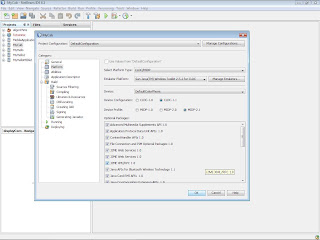 Then I write click on my project, go properties, deploying and set the Deployment Method to "File Copy" and i set a valid folder. I right clickd on my project again and i selected "Deploy" to which it compiles it all as it should and it creates a JAR and a JAD in the specified folder. Now how do i actually go about getting this onto my phone? I have tried sending both the JAR and JAD to my phone (one at a time of course because even selecting both and going send will only send them one at a time) via bluetooth and USB, and the phone recognizes it as a Java program like everything else i have downloaded and recieved, but when it tries to install it (Says "Please Wait" for a few seconds), it says "Operation Failed". Dissapointment again :-(
But after googling i found out that i need to install the relervent SDK of my phone and through it i should make my jar and jad files. The SDK provides a bunch of tools for controlling and manipulating the mobile device. For example, theSony Ericsson SDK provides a whole set of tools that allow you to access the phone directly such as manipulating memory, debugging on the actual device as well as directly installing software onto it. In this case, it takes a JAD and JAR file, and installs it directly onto the phones memory, basically bypassing the phones functionality. The additional advantage is that unlike the phone, it will provide you with exact reasons why it failed.
So, the steps should be:
1) Install the SDK.
2) If using Netbeans, Right click on your project and Go properties->Platform
3) Make sure that you have set the right Emulator Platform set (in my case, it is "Sony Ericsson SDK 2.5.0 for the Java(TM) ME Platform(Debug On-Device)"). From there, select the correct device type. I chose "SonyEricsson_JP-7". I could have been specific to my phone, however this seems to be a good generic choice, and it workes fine for me (You may need to find the correct compatible one for your phone).
4) Under Deploying, select "File Copy", and then pick a destination.
5) Press OK. Go back and right click on your project but this time, press deploy. You should find it will compile your JAR and JAD. From here, you have 2 installation methods:
a) Using the SDK of your phone, directly install the Midilet to your phone using the JAD and JAR files.
b) Using whatever transfer method you have handy (USB, Bluetooth or Infrared), send the JAR file to your phone. In my case, Right-clicking on the JAR and going "Send to->Bluetooth device" works fine. In some cases, if you have installed the extra software for your phone, you may have a "Send to->Usb Device->My Phone" or something. Alternatively, the PC Suite it comes with may help you here.
I got this information from the oficial sun forum site http://forums.sun.com/
I am really a new comer for this field and when i developed my very first J2ME app in netbeans IDE, I wanted it to install in my phone. So just made a little googling and came up with a general idea.
Before googling when i explored the packages created by netbeans IDE, i found in the 'dist' folder there are jar and jad files. SO i directly send them to my phone and tried to install. But while the process is in the half way installing, it gave the massage 'invalid operation'.
 Then I write click on my project, go properties, deploying and set the Deployment Method to "File Copy" and i set a valid folder. I right clickd on my project again and i selected "Deploy" to which it compiles it all as it should and it creates a JAR and a JAD in the specified folder. Now how do i actually go about getting this onto my phone? I have tried sending both the JAR and JAD to my phone (one at a time of course because even selecting both and going send will only send them one at a time) via bluetooth and USB, and the phone recognizes it as a Java program like everything else i have downloaded and recieved, but when it tries to install it (Says "Please Wait" for a few seconds), it says "Operation Failed". Dissapointment again :-(
But after googling i found out that i need to install the relervent SDK of my phone and through it i should make my jar and jad files. The SDK provides a bunch of tools for controlling and manipulating the mobile device. For example, the
So, the steps should be:
1) Install the SDK.
2) If using Netbeans, Right click on your project and Go properties->Platform
3) Make sure that you have set the right Emulator Platform set (in my case, it is "
4) Under Deploying, select "File Copy", and then pick a destination.
5) Press OK. Go back and right click on your project but this time, press deploy. You should find it will compile your JAR and JAD. From here, you have 2 installation methods:
a) Using the SDK of your phone, directly install the Midilet to your phone using the JAD and JAR files.
b) Using whatever transfer method you have handy (USB, Bluetooth or Infrared), send the JAR file to your phone. In my case, Right-clicking on the JAR and going "Send to->Bluetooth device" works fine. In some cases, if you have installed the extra software for your phone, you may have a "Send to->Usb Device->My Phone" or something. Alternatively, the PC Suite it comes with may help you here.
I got this information from the oficial sun forum site http://forums.sun.com/
Subscribe to:
Posts (Atom)